
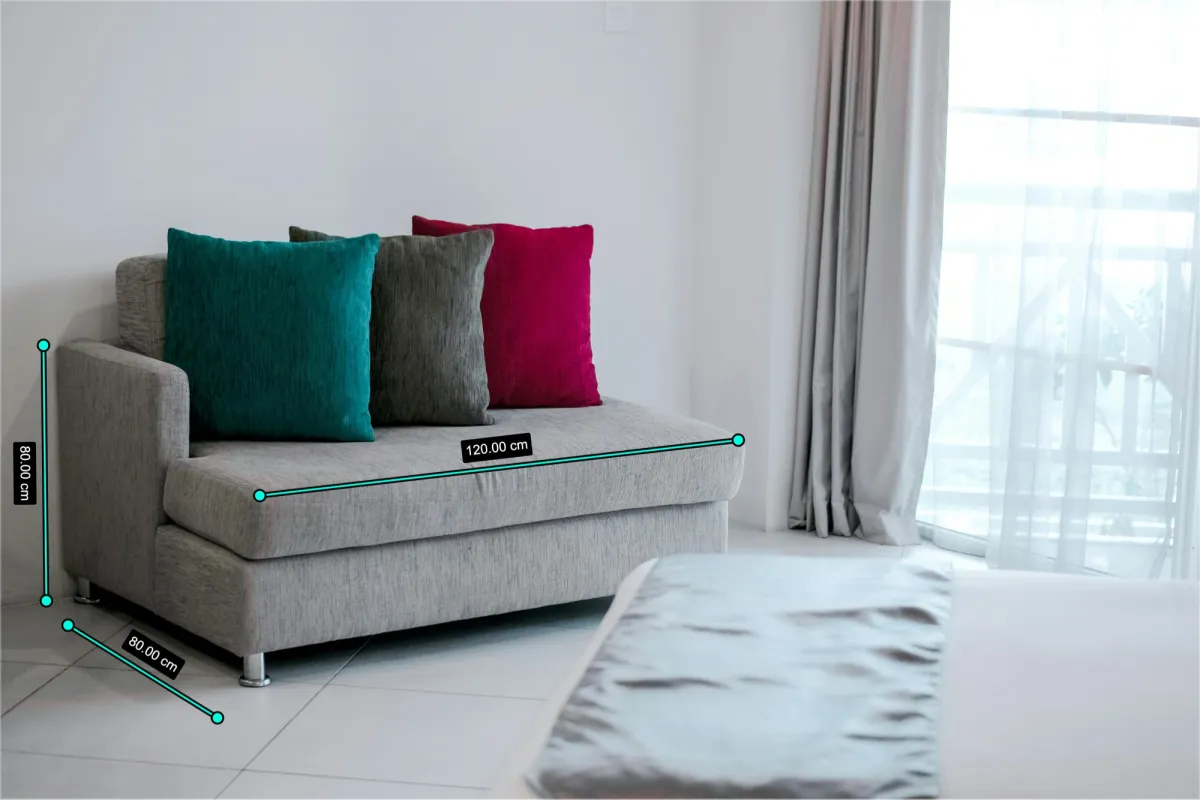
How to Add Size Dimensions to Product Images & Videos
Practical, seller-friendly guide to reduce returns and build trust.
This guide shows you how to add size to product images and videos using clean product dimension labels and measurement labels that look professional and on-brand. It is designed for e-commerce teams that want fewer size-related questions and higher conversion rates.
At a glance
- Best for: e-commerce sellers of physical products
- Time per SKU: 1-2 minutes for images; 2-3 minutes for video
- Outcome: consistent product image dimensions and product video dimensions across your catalog
Key takeaways
- Clear size labels reduce "How big is it?" messages and returns.
- Consistent measurement labels for photos make listings look more professional.
- A repeatable workflow helps you scale annotations across an entire catalog.
Why size dimensions matter for e-commerce
Business impact:
- Size-related returns can reach 22% in some categories.
- Clear dimension labels can reduce size-related returns by up to 40%.
- Listings with helpful visuals often see higher conversion rates.
Customer impact:
- "This seller is transparent."
- "I can picture how big this is."
- "I feel confident placing the order."
Before you start (prep checklist)
1) Strong base assets
- Sharp focus and even lighting
- Full product visible, not cropped
- Angles that show width, height, and depth
2) Accurate measurements
- Measure length, width, height (or diameter for round items)
- Use one unit system consistently
- Double-check values before publishing
3) Measurement rules
- Decide units by market (inches vs centimeters)
- Set rounding rules (e.g., 12 in vs 12.0 in)
- Define how to measure flexible items (bags, apparel)
4) The right tool
Choose a size annotation tool that keeps labels clean and consistent. If you need product video dimensions, pick a video annotation tool that supports timed labels.
- Dimension lines and arrows
- Custom fonts and colors
- Export in PNG/JPEG and MP4/WebM
Step-by-step workflow (images and videos)
These steps work for images and videos. For videos, you will also choose when each annotation appears.
Step 1: Upload a clean product image or video
Goal: start with a clear, full product view.
Do this:
- Use a straight-on view (front, side, or top)
- Keep the background clean
- Use stable, sharp video footage
Common formats:
- Images: JPEG, PNG, WebP
- Videos: MP4, WebM, MOV
Step 2: Choose a dimension style
Goal: match your brand and product category.
Good options:
- Simple arrows for a clean, modern look
- Bracket lines for technical items
- Filled labels for high-contrast visibility
Step 3: Draw measurement lines
Goal: place lines that read clearly at a glance.
Do this:
- Keep lines outside the product when possible
- Align multiple lines for a neat grid
- Leave breathing room around labels
Step 4: Enter the measurement value
Goal: show the exact number and unit.
Do this:
- Enter the true measurement (avoid rounding up)
- Keep units consistent across the listing
- Include both units only if your market needs it
Step 5: Match your brand style
Goal: make annotations feel premium and consistent.
Do this:
- Use high-contrast colors
- Stick to a bold, readable font
- Keep line thickness consistent across SKUs
Step 6: Add all key dimensions
Goal: answer the most common size questions.
Examples:
- Height and width for flat products
- Height, width, and depth for 3D items
- Diameter for round products
- Key fit points for apparel (chest, waist, inseam)
Step 7: Export and QA
Goal: ensure readability on mobile.
Do this:
- Preview at small sizes (phone width)
- Check for overlap on key product details
- Export at your platform's recommended resolution
Design tips that improve conversion
- Contrast is everything: light products need dark labels; dark products need light labels.
- Keep placement consistent: height on the right, width along the bottom, depth on a secondary image if needed.
- Go mobile-first: increase font size and avoid overlaps with product details.
Scale this across your catalog
- Build one template per category (font, color, line weight).
- Batch annotate by category to keep style consistent.
- Add a QA pass before upload.
- Track rules in a simple spec sheet (units, rounding, placement).
Video-specific tips
- Show dimensions when the product is stable and centered.
- Keep each label visible for 2-4 seconds.
- Use subtle fade-in and fade-out animations.
- Remember: many shoppers watch without sound.
Before and after examples
| Product | Before | After |
|---|---|---|
| Backpack | "How big is it?" questions in the Q&A | Height, width, and depth labeled at a glance |
| Wall art | Shoppers unsure of scale | Dimensions plus a room-scale reference |
| Kitchen appliance | Looks like every other product | Height, base diameter, and capacity labeled |
| Jewelry box | Beautiful but unclear size | Exterior and interior compartments labeled |
Common mistakes to avoid
| Mistake | Fix |
|---|---|
| Guessing measurements | Measure and verify before publishing |
| Low-contrast labels | Increase contrast or use a solid label chip |
| Crowding too many labels | Split into multiple images |
| Inconsistent styling | Use a template for fonts, colors, and line weights |
Platform-specific considerations
| Platform | Image placement guidance | Notes |
|---|---|---|
| Amazon | Use annotated images as secondary images (positions 2-7). Infographic-style visuals perform well. | Keep labels readable on mobile. |
| Shopify | Full control. Use annotations in primary images when size is a key decision factor. | Check cropping in collection grids. |
| Etsy | Handmade buyers care about scale. Include real-world references when possible. | Show inches/cm near a common object. |
| eBay | Clear dimensions reduce disputes. | Accuracy matters more than style. |
Video format quick guide
| Platform | Format | Aspect ratio | Length |
|---|---|---|---|
| Amazon | MP4 | 16:9 | Up to 5 minutes |
| TikTok Shop | MP4 | 9:16 | 15-60 seconds |
| MP4 | 1:1 or 9:16 | Up to 90 seconds | |
| Shopify | MP4 | Any | No strict limit |
Closing thoughts
Clear, consistent size labels turn uncertainty into confidence and reduce size-related questions before they reach your inbox. Start with a single product category, build a simple style template, and scale the workflow across your catalog.